
For most people, their phone is the single most data rich device they own. It knows where you are, who you speak to, what you search for, what you photograph, and how you spend your time. Unlike a laptop, it is always on, always connected, and almost always within reach.
That makes it a powerful tool, but also a significant privacy risk. Protecting your phone is no longer optional. It is central to protecting your digital life.
Why Phones Are a Prime Target
Modern smartphones are designed to collect and process large amounts of data. This is not inherently malicious, it enables features such as navigation, personalised content, and seamless communication. However, it also creates a detailed and continuous record of your behaviour.
This data is valuable. It can be accessed by app developers, advertisers, and in some cases government authorities. The Privacy International has documented how mobile apps often collect and share data far beyond what users expect.
“Your phone is a goldmine of personal data.”
The risk is not just that data is collected, but that it is shared, stored, and potentially exposed.
App Permissions: The First Line of Control
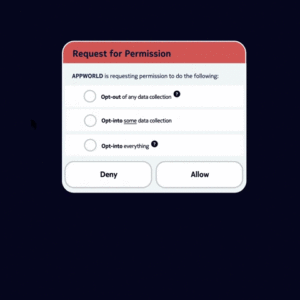 One of the most effective ways to reduce surveillance is to control what apps can access.
Many apps request permissions that are not strictly necessary for their function. For example, a simple game may request access to your contacts or location. Once granted, that access can be continuous.
The UK’s Information Commissioner’s Office advises users to regularly review app permissions and remove anything that is not essential.
Focus on:
-
Location access
-
Contacts and call logs
-
Microphone and camera
-
File and storage access
Limiting permissions does not eliminate data collection, but it significantly reduces the scope.
Location Tracking: Always On, Often Overlooked
Location data is one of the most sensitive forms of information your phone generates. It can reveal where you live, work, travel, and spend your time.
Many apps collect location data even when they are not actively in use. This is often justified as improving functionality, but in practice it contributes to long term tracking.
To reduce this:
-
Set location access to “while using the app” where possible
-
Disable precise location for apps that do not need it
-
Review system level location services regularly
Even small adjustments can limit the creation of detailed location histories.
Operating Systems: iOS vs Android
Both major mobile operating systems offer privacy controls, but they approach them differently.
iOS tends to enforce stricter app level controls and requires explicit permission for tracking across apps. Android offers more flexibility and customisation, but this can place more responsibility on the user to configure settings correctly.
Neither system is inherently private by default. Both collect some level of data, and both rely on app ecosystems that may introduce additional risks.
The key is not choosing a perfect system, but understanding how to use the controls available to you.
Secure Communication
Your phone is also your primary communication device, which makes it a key point of exposure.
Using apps with strong encryption, such as Signal, helps protect the content of your messages from interception. Signal is widely recommended because it combines end to end encryption with minimal data collection.
However, it is important to remember that encryption protects content, not necessarily metadata. Who you communicate with and how often may still be visible in some contexts.
Even so, secure messaging significantly reduces one of the most common forms of surveillance.
Background Data and Tracking
Many apps continue to send and receive data even when you are not actively using them. This background activity can include analytics, tracking, and updates.
To limit this:
-
Disable background data for non essential apps
-
Restrict app refresh where possible
-
Remove apps you no longer use
Each app you install increases your attack surface. Reducing that number is one of the simplest and most effective steps you can take.
Device Security Still Matters
While privacy focuses on data collection, basic security remains essential. If your device is compromised, your data is exposed regardless of how carefully you manage permissions.
Key steps include:
-
Keeping your operating system up to date
-
Using a strong passcode or biometric lock
-
Enabling device encryption
-
Avoiding untrusted app sources
These measures protect against unauthorised access, which is still a major risk.
Network Awareness
Phones frequently connect to public WiFi networks, which can expose data if not handled carefully.
Using a VPN can add a layer of protection by encrypting your traffic, particularly on unsecured networks. While it does not make you anonymous, it reduces the ability of network operators to monitor your activity.
Being selective about which networks you connect to is equally important.
A More Realistic Approach
It is not practical for most people to eliminate all forms of mobile tracking. Smartphones are deeply integrated into modern life, and many features depend on data collection.
The goal is not total isolation, but informed control. Reducing unnecessary data flows, limiting permissions, and choosing better tools can significantly improve your privacy without sacrificing usability.
Final Thought
Your phone is both your most personal device and your most exposed one.
Protecting it does not require extreme measures, but it does require awareness and consistent action. Small changes, applied thoughtfully, can greatly reduce how much of your life is collected, analysed, and shared.
In a world where surveillance is often passive and invisible, control begins with how you configure the device in your pocket.
